Dyne.org
Tomb :: Folder Encryption on GNU/Linux
We are hackers.Tomb is a system to make strong encryption easy for everyday use. A tomb is like a locked folder that can be safely transported and hidden in a filesystem.

Tomb is a 100% free and open source tool that facilitates managing secret files in volumes protected by strong encryption.
Tomb’s ambition is to improve safety by way of:
- a minimalist design consisting of small and readable code
- the facilitation of good practices, i.e.: key/storage physical separation
- the adoption of a few standards and battle-tested components
How it works
We design Tomb’s hidden file encryption to generate encrypted storage folders to be opened and closed using associated key files, which are also protected with a password chosen by the user.
A tomb is a file whose contents are kept secret and indistinguishable; it can be safely renamed, transported and hidden in filesystems; its keys should be kept separate, for instance, keeping the tomb file on your computer’s hard disk and the key files on a USB stick. Once open, the tomb looks like a folder.
Tomb derives from scripts used in the dyne:bolic 100% Free GNU/Linux distribution and a shell script (Zsh) using standard filesystem tools (GNU) and the cryptographic API of the Linux kernel (dm-crypt and LUKS via cryptsetup). Tomb’s status and error messages are translated into many human languages and have multiple graphical applications to operate.
Get Started
Tomb works only on GNU/Linux systems and WSL2 starting with Windows11.
If you are already familiar with using the command line, download the tar.gz and jump to the installation instructions.
Tomb is also found in many distributions, so you can use your package manager to install it.
However, Tomb is a single script and is very easy to install manually. Using make install in our source distribution will copy it into /usr/local/bin along with its manpage (man tomb) and language translations.
Be in charge of your system, and may the source be with you!

Usage
Tombs are operated from a terminal command line and require root access to the machine (or just sudo access to the script).
To create a 100MB tomb called “secret” do:
tomb dig -s 100 secret.tomb
tomb forge secret.tomb.key
tomb lock secret.tomb -k secret.tomb.key
To open it, do
tomb open secret.tomb -k secret.tomb.keyAnd to close it
tomb closeOr if you are in a hurry
tomb slam allWill close immediately all open tombs, killing all applications using them.
Here is a lovely review made by the Linux Action Show guys in August 2014, where they recommend Tomb as a replacement for Veracrypt
Advanced usage
The tomb script takes care of several details to improve a user’s behaviour and the security of tombs in everyday usage: it protects the typing of passwords from keyloggers, facilitates hiding keys inside images, mounts directories in place without copying delicate files around, allows a user to kill all running processes and slam close a tomb in a straightforward command, warns the user about free space and last-time usage, etc.

One can use multiple tombs simultaneously on the same system and list them using tomb list.
Using tomb resize, one can expand tombs to have more space (but cannot shrink them).
When it is open, a tomb can bind contents inside the user’s $HOME folder using bind-hooks. For instance, .gnupg will only be found inside your $HOME when the tomb opens.
A tomb can be used on a local machine with keys on a server and never stored on the same device: ssh me@dyne.org 'cat my.tomb.key' | tomb open my.tomb -k - the option -k - tells tomb to take the key from stdin.
It is also possible to store a tomb on a cloud service and mount it locally, ensuring remote servers cannot access contents. One can use sshfs for this:
sshfs -o allow_root me@dyne.org:/ /mnt/cloud/
tomb open /mnt/cloud/my.tomb -k my.key
This paper provides a lot of details about using tombs hosted on cloud storage.
Tomb also supports deniable key storage using steganography. One can tomb bury and tomb exhume keys to and from JPEG images when the utility steghide is installed. When securing private data, one must never forget where the keys are. It may be easier to remember a picture, as well it may be less suspicious to transport it and exchange it as a file.
The command tomb engrave also allows to backup keys on paper by saving them as printable QR codes, to hide it between the pages of a book. To recover an engraved key, one can scan it with any phone and save the resulting plain text file as the tomb key.
You can also watch this other video guide by Nerd on the Street.
External applications
The following applications are compatible with Tomb:
-
pass-tomb is a console-based wrapper of the excellent password-keeping program pass that helps to keep the whole tree of passwords encrypted inside a tomb.
-
Secrets is an online software to split a Tomb key into shares that a quorum of owners can merge to reconstitute.
-
Mausoleum is a graphical interface to facilitate the creation and management of tombs, written in Python.
-
zuluCrypt is a graphical application to manage various types of encrypted volumes on GNU/Linux, among them also Tombs, written in C++.
How secure is Tomb?
Death is the only sure thing in life. That said, Tomb is a pretty secure tool mainly because it is kept minimal, its source is always open to review (even when installed), and its code is easy to read with some shell script knowledge. Plus, no cloud or network connection is needed: Tomb works offline.
GNU/Linux distributions include all encryption tools we use in Tomb and therefore, they are regularly peer-reviewed: we don’t add anything else to them, just a layer of usability.
If needed, it is always possible to access the contents of a tomb without the tomb script, only using a few commands typed into any shell interpreter:
lo=$(losetup -f)
losetup -f secret.tomb
gpg -d secret.key | head -c -1 | cryptsetup --key-file - luksOpen $lo secret
mount /dev/mapper/secret /mnt
One can change the last argument /mnt to where the Tomb has to be
mounted and made accessible. To close the tomb, use:
umount /mnt
cryptsetup luksClose /dev/mapper/secret
Who needs Tomb
Democracy requires privacy as much as Freedom of Expression. - Anonymous
The world is full of prevarication and political imprisonments, war rages in several places, and media is mainly used for propaganda by the powers in charge. Some of us face the dangers of being tracked by oppressors opposing our self-definition, independent thinking and resistance to homologation.
Our target community are GNU/Linux users with no time to click around, sometimes using old or borrowed computers, operating in places endangered by conflict where a leak of personal data can be a threat.
Even if one can’t own a laptop, Tomb makes it possible to go around with a USB stick and borrow computers, leaving no trace and keeping data safe during transport.
The distinction between public and private is becoming increasingly blurred with the increasing intrusiveness of the media and advances in electronic technology. While this distinction is always the outcome of continuous cultural negotiation, it continues to be critical, for where nothing is private, democracy becomes impossible.
The Internet offers plenty of free services; in most cases, corporate or state monopolies host all private information. Server-hosted services and web-integrated technologies gather all data into huge information pools made available to established economic and cultural regimes.
Tomb is ethical software that empowers everyone to protect their privacy.
Aren’t there enough encryption tools?
The current situation in personal desktop encryption is far from optimal.
The encrypted home mechanism of most operating systems doesn’t make it easy to transport around, and they do not separate the keys from the storage: only the password is needed to open them, which is prone to brute-forcing attacks.
TrueCrypt makes use of statically linked libraries so that its code is hard to audit, plus is not considered free by operating system distributors because of liability reasons, see Debian, Ubuntu, Suse, Gentoo and Fedora.
Veracrypt is a very portable rewrite of TrueCrypt (works also on Mac OSX) but is very slow and has some interaction patterns that are not secure. Its way of encrypting is comparable to Tomb.
EncFS doesn’t need root access. But it has drawbacks: it implements weaker encryption, doesn’t promote the separated storage of keys and exposes the size of each single file rather than hiding the structure of a folder.
Watch Tomb’s development history in this infographic based on git commits.
Compliancy
Tomb qualifies as sound for use on information rated as “top secret” when used on an underlying stack of carefully reviewed hardware (random number generator and other components) and software (Linux kernel build, crypto modules, device manager, compiler used to built, shell interpreter and packaged dependencies).
Tomb volumes are fully compliant with the FIPS 197 advanced encryption standard published by NIST and with the following industry standards:
- Information technology — Security techniques — Encryption algorithms
- ISO/IEC 18033-1:2015 — Part 1: General
- ISO/IEC 18033-3:2010 — Part 3: Block ciphers
Tomb implementation is known to address at least partially issues raised in:
- Information technology — Security techniques — Key management
- ISO/IEC 11770-1:2010 — Part 1: Framework
- ISO/IEC 11770-2:2008 — Part 2: Mechanisms using symmetric techniques
- ISO/IEC 27005:2011 Information technology — Security techniques — Information security risk management
- ISO/IEC 24759:2014 Information technology — Security techniques — Test requirements for cryptographic modules
Any help on further verification of compliance is very welcome, as our access to ISO/IEC documents is limited.
Development
 Tomb is on GitHub, where most of the community activity goes.
Developers can interact with us via a discussion area, issues, or pull requests. The README is also a brief introduction for developers willing to engage.
The short tomb tester howto provides a guide to troubleshooting problems. Anyone planning to write code in Tomb should first look at the short tomb developer howto.
To get in touch with us in person please plan to participate in one of the yearly italian hackmeeting, usually held during summer on the peninsula.
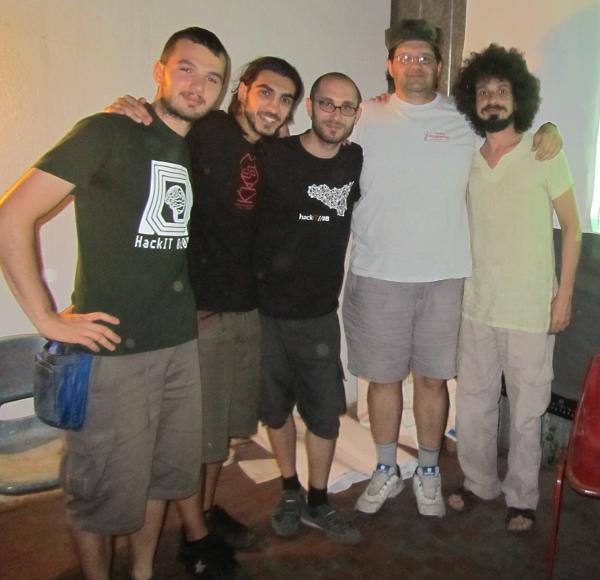
A cheerful picture of Tomb developers crew at Hackmeeting 2011 in Firenze
All I know is what the words know, and dead things, and that makes a handsome little sum, with a beginning and a middle and an end, as in the well-built phrase and the long sonata of the dead. - Samuel Beckett